
You know breaks are good for you. You've probably read that they boost focus, cut fatigue, and stop the 3 p.m. crash. And yet it's 2 p.m., you haven't moved since 9, and lunch was a sandwich over your keyboard.
You're not alone. In a 2023 Slack survey of more than 10,000 desk workers, half said they rarely or never take breaks during the workday. The problem usually isn't knowing why to rest. It's that breaks never make it into the plan, so they lose to whatever feels urgent.
This guide is about the planning part: how often to take breaks, how long they should be, where they go in your day, and what to do when the day gets away from you.
The short version: Take a short break of 5 to 10 minutes about once an hour, a real lunch away from your desk, and a 15-minute break before the mid-afternoon dip. Put the bigger breaks on your calendar like meetings, and keep the tiny ones (looking away from the screen, standing up) as habits. Take longer breaks after harder work. If you skip one, take a smaller one later instead of waiting for the "right" moment.
Three kinds of breaks, three different clocks
Most advice lumps every break together. It helps to split them up, because they work on different timescales:
| Eye reset | Movement break | Recovery break | |
|---|---|---|---|
| How long | 20 seconds to a minute | 2 to 5 minutes | 10 to 45 minutes |
| How often | Every 20 minutes or so | Every 30 to 60 minutes | A few times a day |
| What it's for | Screen-tired eyes | Sitting too long | Energy and focus |
| Example | Look out of a window | Stand up, refill water, stretch | A walk outside, lunch, a nap |
| Plan it? | Habit, no calendar | Habit, or a reminder | Yes, put it on the calendar |
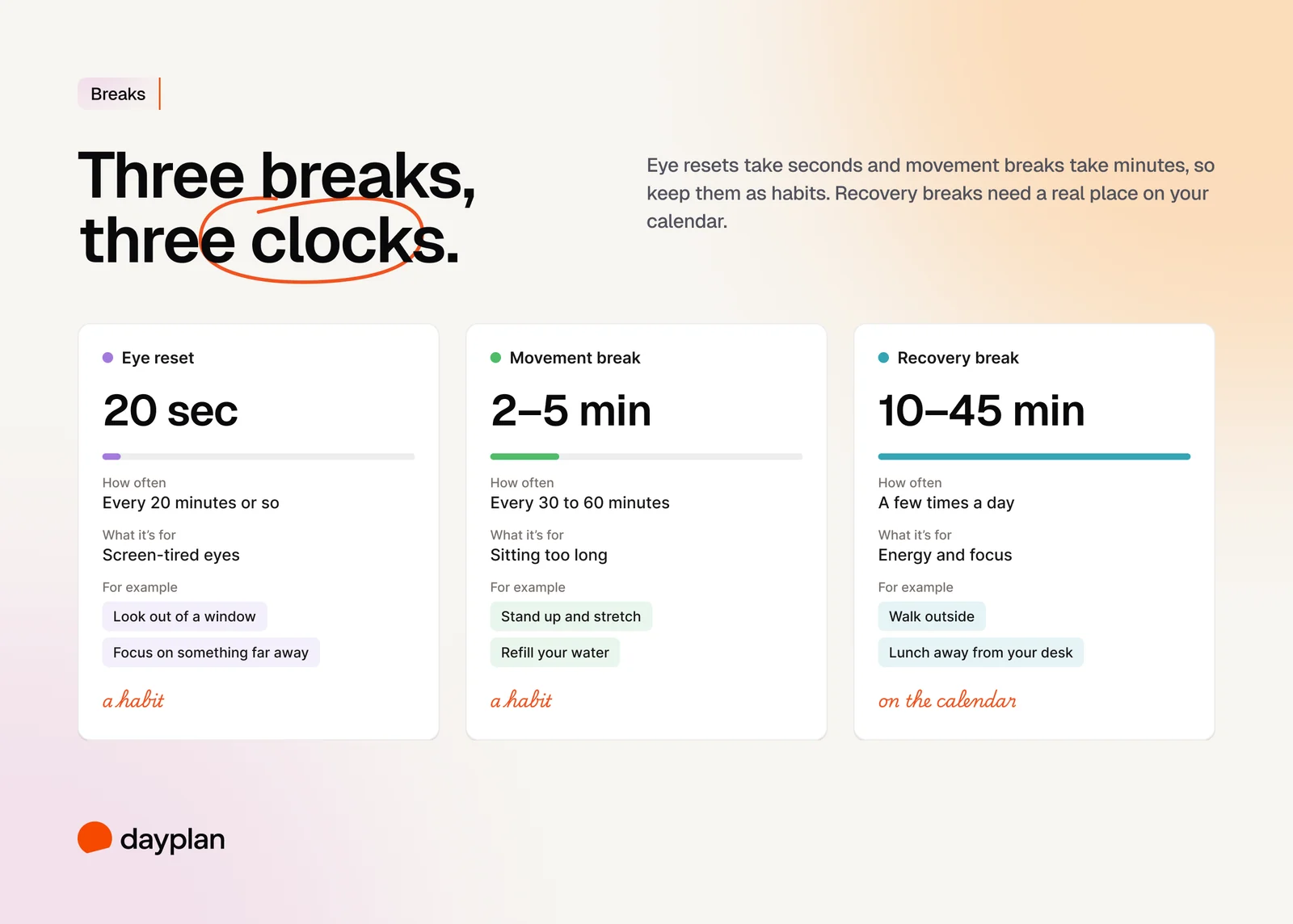
The rest of this guide is mostly about recovery breaks, the ones that need a place in your plan. For what to actually do on a break, and why scrolling doesn't count, see why social media ruined your breaks.
How often should you take breaks?
About once an hour, for 5 to 10 minutes. That's the guidance from the UK's Health and Safety Executive for people who work at screens: "5 to 10 minutes every hour is better than 20 minutes every 2 hours." In other words, short and often beats long and rare.
Two things on top of that:
- Before the afternoon dip. Many people get a real drop in alertness in the mid-afternoon, and sleep researcher Timothy Monk notes it can happen even if you skip lunch. It's partly your body clock, so it's a natural place for a planned break.
- After every long stretch of focus. In the classic study of expert violinists by Anders Ericsson, practice sessions averaged about 80 minutes, and their teachers recommended keeping them under an hour with rest in between. Treat 60 to 90 minutes as a sensible ceiling for deep work, not a rule your brain runs on.
How long should a break be?
It depends on what you're recovering from.
A 2022 meta-analysis of 22 studies on micro-breaks (10 minutes or less) found they modestly raise energy and lower fatigue. The effect on performance was smaller, and it grew with the length of the break. The authors also note that recovering from really draining work may take more than 10 minutes.
So a rough guide:
- Light or routine work: 5 to 10 minutes an hour is plenty.
- Demanding work (writing, analysis, hard decisions): take 15 minutes or more after a long block.
- Lunch: at least 15 to 30 minutes, away from your desk. In a Finnish study, a 15-minute walk in a park at lunch was linked to better concentration and less fatigue that afternoon.
Fixed schedule, or whenever you feel like it?
You've probably heard of the Pomodoro Technique: 25 minutes of work, a 5-minute break, and a longer break every four rounds. It's a good starting rhythm, especially if you never take breaks at all. But it isn't a proven formula.
Studies comparing fixed breaks with self-chosen ones mostly find no difference in how much people get done. One study found fixed breaks improved mood; a later one found self-chosen breaks did. Having some control seems to matter: a study of lunch breaks found that how much say people had over their lunch changed whether it left them more or less tired. The HSE agrees: "users should be able to choose when to take breaks."
What we recommend: plan the anchors, flex the rest. Put lunch and an afternoon break on your calendar so they actually happen. Take the smaller ones when you hit a natural pause.
Two popular rules to take with a pinch of salt
- The 52/17 rule (work 52 minutes, break for 17) comes from one time-tracking app's user data, not a controlled study. When the company ran its numbers again, it came out at 112 minutes of work and 26 minutes of break.
- "Your brain works in 90-minute cycles." There is research on roughly 90-minute rhythms, but it's mostly about sleep and small lab tests. It's not a reliable timer for your workday.
How to plan breaks into your day: 5 steps
1. Start with your anchors: lunch and the afternoon dip
Before anything else, give lunch a real time and length. Then add one break in the mid-afternoon, usually somewhere between 2 and 4 p.m. These two do most of the work.
2. Add a break after every long focus block
Look at the blocks where you'll do your hardest work, and put a 10 to 15-minute break right after each one. If you time block your day, this is easy: breaks are just blocks too.
3. Put recovery breaks on your calendar
A break that only lives in your head loses to every email. A break with a time is more likely to happen, for the same reason a task with a time is. Treat it like a meeting with yourself. It's also the easiest way to check that your day has room: if the breaks don't fit, the plan is too full. (More on that in capacity-first planning.)
4. Keep micro-breaks as habits, not appointments
You don't need a calendar entry to look away from your screen.
- For your eyes: eye doctors' groups recommend the 20-20-20 rule. Every 20 minutes, look at something at least 20 feet away for at least 20 seconds. The research behind those exact numbers is thin, so treat it as an easy habit, not a cure.
- For your body: stand up and move every 30 to 60 minutes. In a small lab study, five minutes of easy walking every 30 minutes improved blood sugar and blood pressure. The World Health Organization simply says to sit less, and that any movement counts.
5. Decide what you'll do before the break starts
If you wait until you're tired to choose, you'll pick your phone. Keep a short list of breaks you actually enjoy, like a walk outside, a coffee with someone, or a few pages of a book, and pick from it. Recovery researchers point to the same ingredients again and again: switching off from work, relaxing, doing something absorbing, and choosing for yourself.
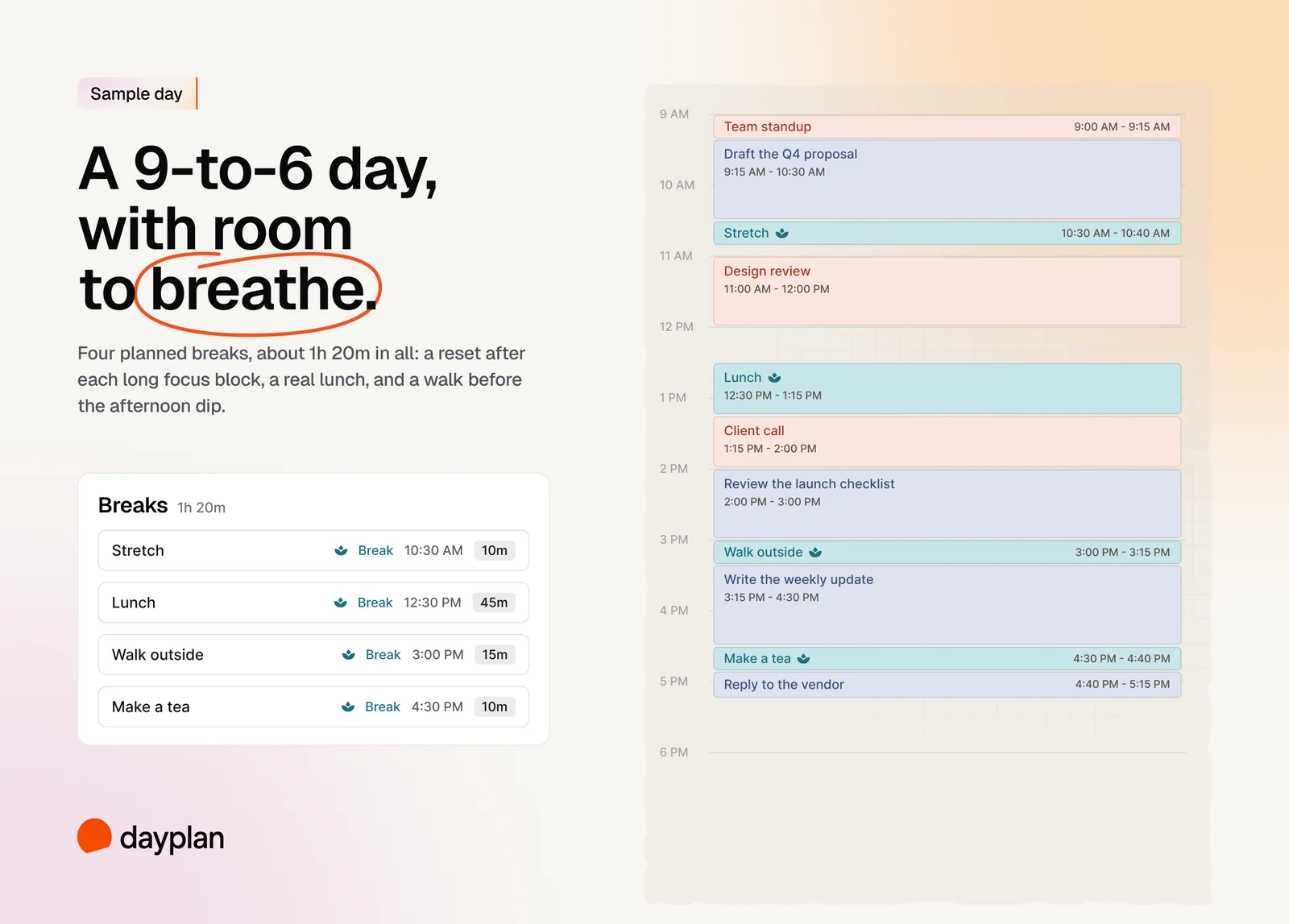
A sample break schedule for a 9 to 6 day
Here's what this looks like on a normal workday:
| Time | Break | How long | Why here |
|---|---|---|---|
| 10:30 AM | Stretch and refill your water | 10m | After the first long focus block |
| 12:30 PM | Lunch, away from your desk | 45m | Anchor: real recovery |
| 3:00 PM | Walk outside | 15m | Anchor: before the afternoon dip |
| 4:30 PM | Make a tea | 10m | After a late block of focus |
| All day | Look away from the screen | 20s | Every 20 minutes or so, as a habit |
| All day | Stand up and move | 2 to 5m | Every 30 to 60 minutes, as a habit |
That's about 1 hour 20 minutes of planned breaks in a 9-hour day, plus the tiny ones. If that sounds like a lot, remember that working through it doesn't usually buy you more done. It just moves the tired hours later.
How to take breaks on meeting-heavy days
Back-to-back meetings are where breaks disappear first. A few things help:
- Make meetings shorter by default. End 30-minute meetings at 25 and hour-long ones at 50. That's a five or ten-minute break built in.
- Protect one real break. If the day is wall-to-wall, block 15 minutes in the mid-afternoon and decline anything that lands on it.
- Walk where you can. A one-to-one or a listening-only call can often be a walking call.
- Reset between calls. In Microsoft's own small brain-scan study, people who took short breaks between video meetings showed signs of their brains resetting between calls. It was only 14 people and not peer-reviewed, but stepping away for a few minutes costs you nothing.
What to do when you skip a break
It happens. Lunch turns into a call, the afternoon turns into a deadline. Don't wait for the perfect moment to make up for it:
- Take a smaller break now. Five minutes is better than the 30 you didn't take.
- Protect the next anchor. If lunch is gone, guard the afternoon break.
- Don't carry it as guilt. A missed break is a missed break, not a debt. Tomorrow's plan starts fresh.
If you skip breaks most days, your plan is probably too full. Plan less work, not fewer breaks.
How Dayplan helps you plan breaks
Dayplan treats breaks as part of the plan, not something you squeeze in if there's time.
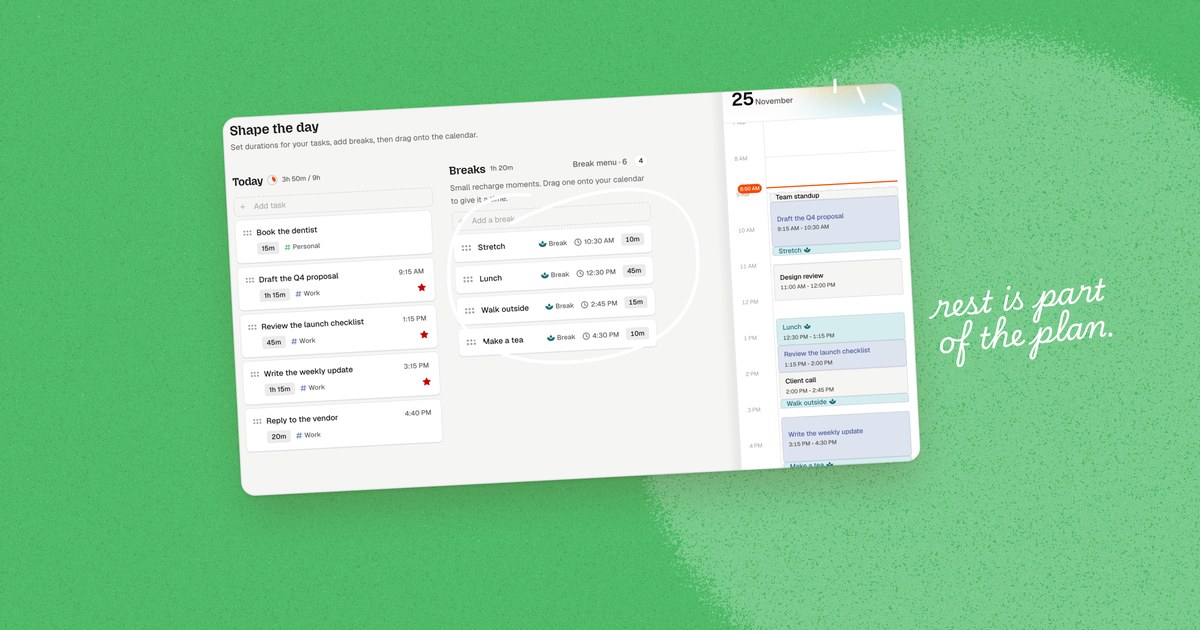
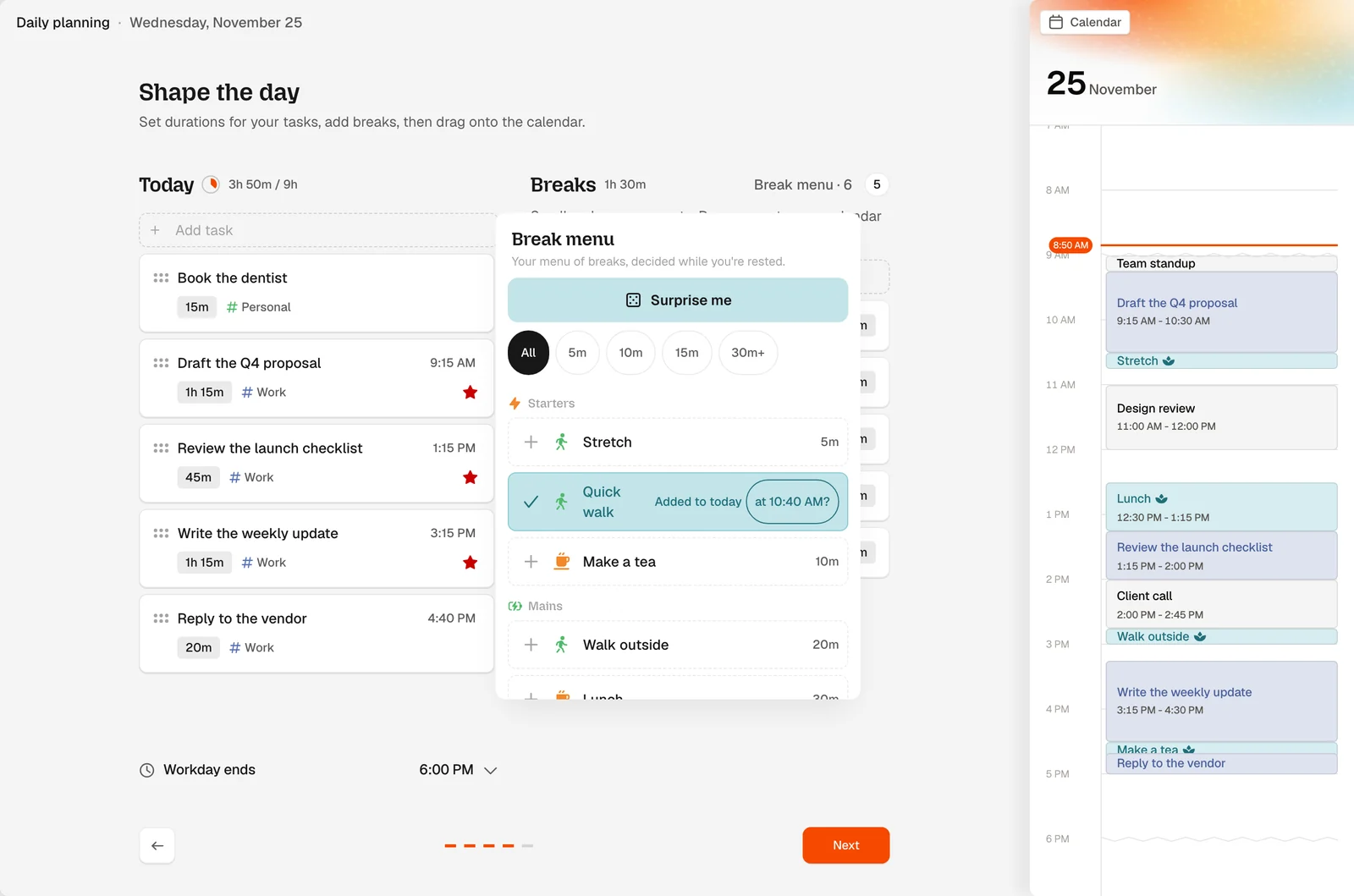
- Breaks have their own place in your daily plan. When you plan your day, the Shape the day step has a Breaks section: "Small recharge moments. Drag one onto your calendar to give it a time." Each break starts at 10 minutes, and you can change it. Dayplan shows your total for the day, like "Breaks 1h 20m".
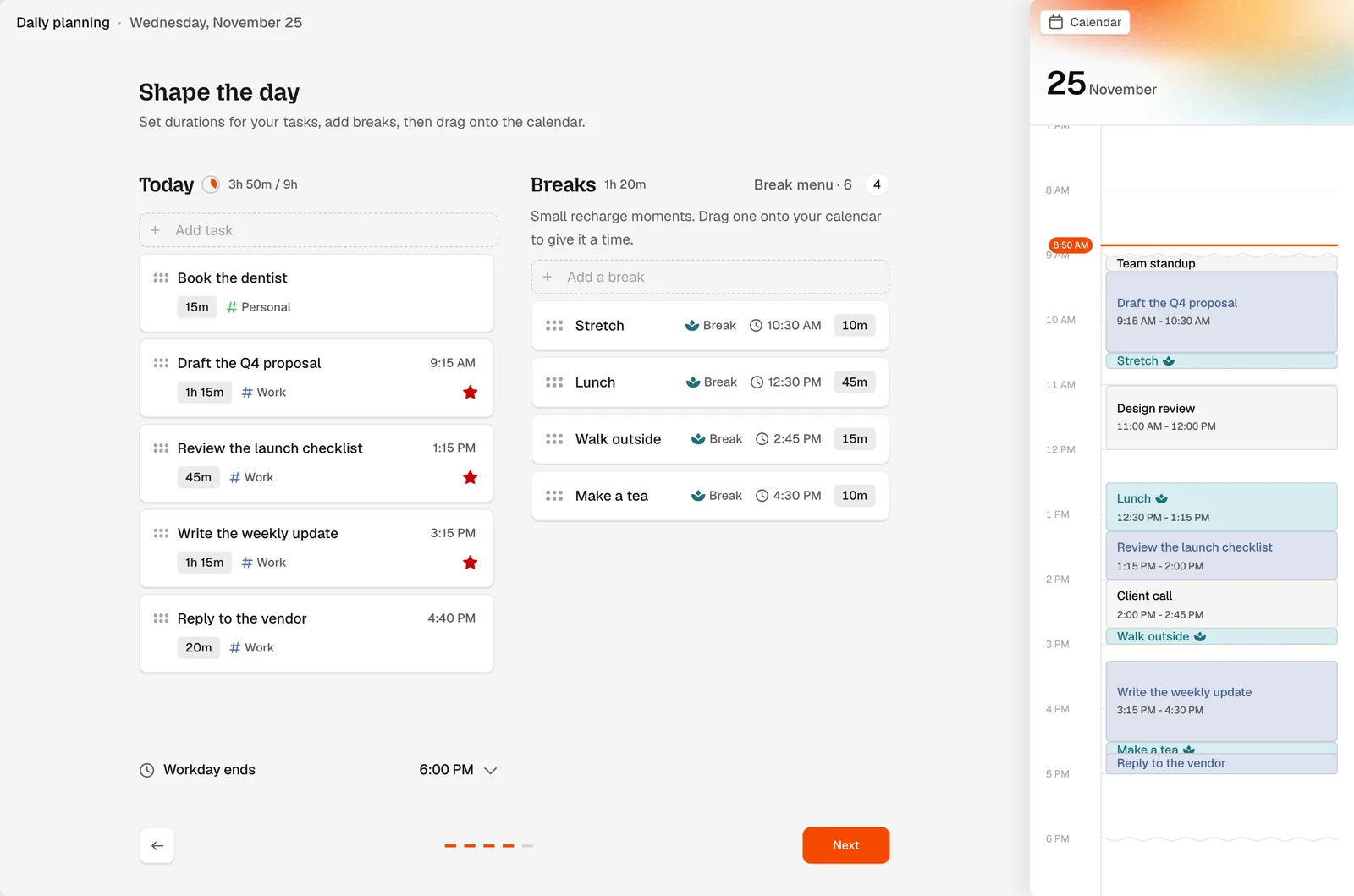
- You pick from a break menu. Your menu is split into Starters (quick resets), Mains (real recharge) and Desserts (treats with a timebox), with ideas like Quick walk, Walk outside, Lunch and Make a tea. As the app puts it, it's "your menu of breaks, decided while you're rested." When you add one, Dayplan offers the next free gap in your day, like "at 10:40 AM?".
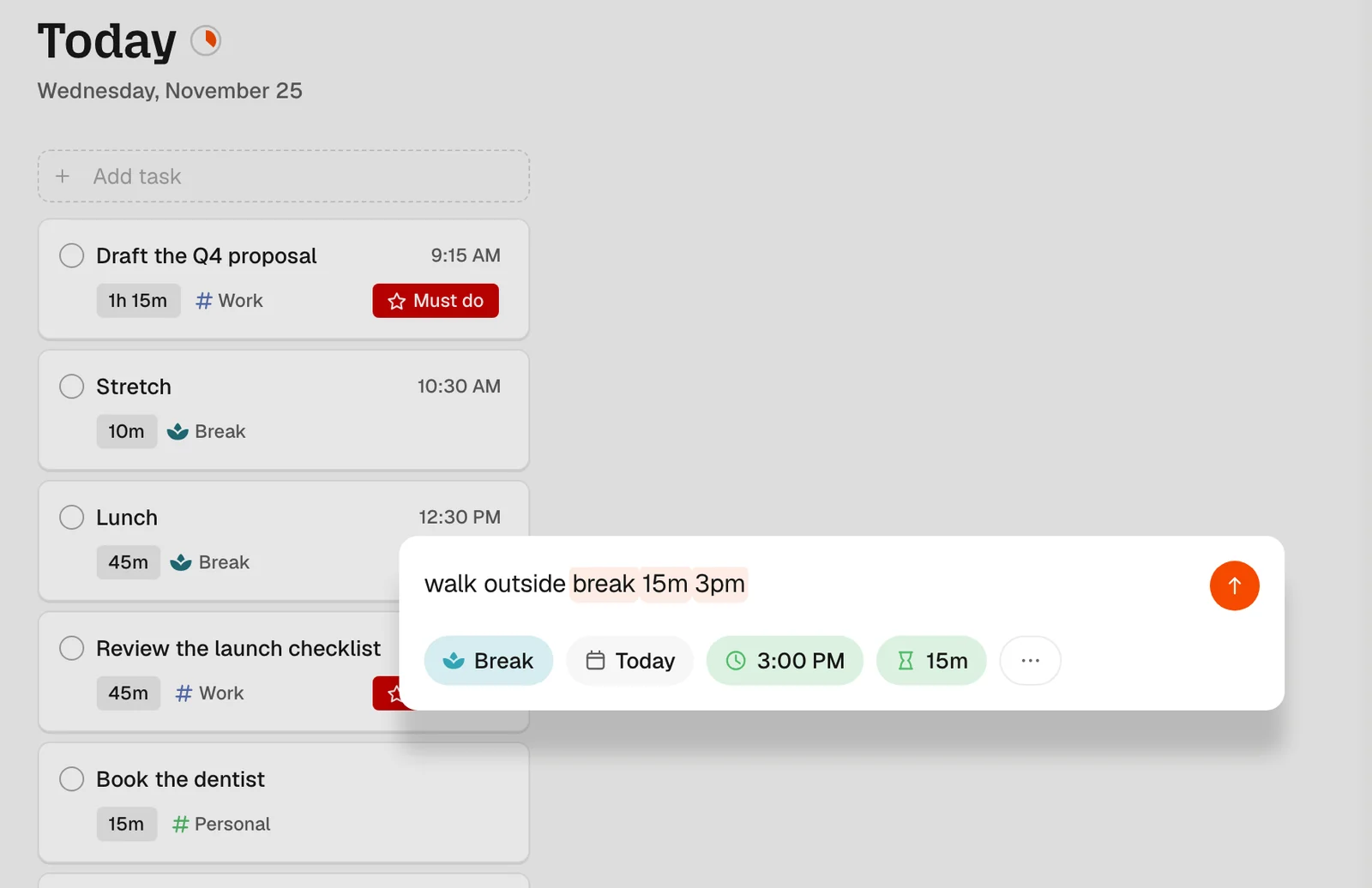
- You can add one in a few words. Type "break 15m" or "walk outside break 15m 3pm" anywhere you add a task.
- Breaks show up in teal on your calendar, so you can see at a glance whether your day has any air in it.
- Skipped breaks don't pile up. Breaks never carry over to tomorrow, so there's no guilt list.
All of this is free. With Pro, the Coach can also send you a break nudge, in the app or over iMessage, when you've been working for over an hour without one, at most twice a day. Read more about breaks in Dayplan, or see how they fit into the daily planning guide.
Frequently asked questions
About once an hour, for 5 to 10 minutes. UK workplace guidance says short, frequent breaks are better than longer, less frequent ones, for example 5 to 10 minutes every hour rather than 20 minutes every two hours. On top of that, take a real lunch and a break before the mid-afternoon dip.
Match it to the work. Short breaks of 5 to 10 minutes are enough for routine work. After demanding work like writing or analysis, take 15 minutes or more. Lunch should be at least 15 to 30 minutes away from your desk.
A good pattern is a short break roughly every hour, a lunch break, and one longer break in the mid-afternoon. That works out to around five or six planned breaks, plus tiny habits like looking away from the screen and standing up.
Short and frequent is generally better for screen work, according to UK workplace guidance. But one longer break, like a real lunch, still matters for recovering from a demanding morning. The best plan has both.
It's a popular rule of thumb, not a scientific finding. It came from one time-tracking app's user data, and when the company ran its numbers again, the result changed to 112 minutes of work and 26 minutes of break. Use whatever rhythm actually gets you to take breaks.
It's a useful starting rhythm, especially if you never take breaks. But studies comparing fixed breaks like Pomodoro with self-chosen breaks generally find no difference in how much people get done. What matters most is that the breaks happen.
End meetings five minutes early by default, turn one-to-ones into walking calls when you can, and block one 15-minute break in the mid-afternoon that you protect like a meeting. Even a few minutes away from the screen between calls helps.
Regularly, yes. A proper lunch break is one of the most reliable ways to protect your afternoon. Research on lunch breaks suggests both getting away from your desk and having a say in how you spend the break make a difference to how tired you feel later.
Yes. Adding breaks, the break menu, dragging breaks onto your calendar, and typing breaks like "break 15m" are all free. Pro adds break nudges from the Coach, in the app or over iMessage.
Sources
- Albulescu P, et al. "Give me a break!" A systematic review and meta-analysis on the efficacy of micro-breaks for increasing well-being and performance. PLOS ONE, 2022.
- Health and Safety Executive (UK). Working safely with display screen equipment.
- Monk TH. The post-lunch dip in performance. Clinics in Sports Medicine, 2005.
- Ericsson KA, Krampe RT, Tesch-Römer C. The role of deliberate practice in the acquisition of expert performance. Psychological Review, 1993.
- Sianoja M, et al. Enhancing daily well-being at work through lunchtime park walks and relaxation exercises: Recovery experiences as mediators. Journal of Occupational Health Psychology, 2018.
- Trougakos JP, et al. Lunch breaks unpacked: The role of autonomy as a moderator of recovery during lunch. Academy of Management Journal, 2014.
- Biwer F, et al. Understanding effort regulation: Comparing 'Pomodoro' breaks and self-regulated breaks. British Journal of Educational Psychology, 2023.
- Göksu A, et al. When to take a break: Comparing effects of systematic short (Pomodoro) and self-regulated breaks on subjective experience and actual learning. Behavioral Sciences, 2026.
- Sonnentag S, Venz L, Casper A. Advances in recovery research: What have we learned? What should be done next?. Journal of Occupational Health Psychology, 2017.
- American Academy of Ophthalmology. Are blue light-blocking glasses worth it? (source of the 20-20-20 rule wording).
- Duran AT, et al. Breaking up prolonged sitting to improve cardiometabolic risk: Dose-response analysis of a randomized crossover trial. Medicine & Science in Sports & Exercise, 2023.
- Bull FC, et al. World Health Organization 2020 guidelines on physical activity and sedentary behaviour. British Journal of Sports Medicine, 2020.
- DeskTime. Productivity research: overview of DeskTime's best finds (the 52/17 rule and its later 112/26 update).
- Slack. The surprising connection between after-hours work and decreased productivity. Workforce Index, 2023.
- Microsoft WorkLab. Research proves your brain needs breaks. 2021.