
It's 9 a.m. You've got a to-do list with eleven things on it, a calendar with three meetings, and somehow you're supposed to do it all in a day.
That's what the time blocking vs. to-do list question is really about. Do you work down a list, or give every task its own slot on the calendar? Our answer: both, just not for everything.
A list is great at remembering, and a calendar is great at deciding. The trick is knowing which tasks need the second one.
Below you'll find a quick test for that, a full example day, and what to do when a block runs over, because one will.
The short version: Use both. A to-do list is for capturing everything you could do; time blocking is for deciding what you'll do today, and when. Keep one list, pick up to three must-dos each morning, estimate them with a little padding, and check they fit in the hours you actually have. Then block only the tasks that need focus, have a fixed time, or keep getting pushed back, plus breaks and some empty room. Everything small stays on the list. When a block runs long, move or shrink what's next instead of letting it eat your afternoon.
Time blocking vs. to-do lists at a glance
| To-do list | Time blocking | |
|---|---|---|
| Answers | What needs doing? | When will I do it? |
| Best for | Catching everything, small and flexible tasks | Focus work, deadlines, things you keep putting off |
| Main strength | Nothing gets forgotten | Turns good intentions into appointments |
| Main weakness | Grows forever; no sense of time | Breaks easily when the day changes |
| What it hides | That the list won't fit in the day | Small tasks that don't fit anywhere |
| Takes | Seconds to update | 5 to 10 minutes to plan |
Where to-do lists shine, and where they fall short
A to-do list is a running list of tasks with no times attached. Lists are brilliant at one thing: getting stuff out of your head. Something comes up, you write it down, you stop thinking about it. They take seconds to update, they don't mind when your day changes, and ticking things off still feels great.
What a list can't do is count. It has no idea that "Write the proposal" is two hours and "Book the dentist" is five minutes. Twelve items look the same whether they add up to two hours or twelve. So the list grows, the hard stuff drifts to the bottom, and around 6 p.m. you're staring at it, wondering where the day went.
A list also won't make anything happen by itself. "Write the proposal" is a wish. "Write the proposal, 9:15 to 11:45" is a plan.
Why time blocking works (and where it doesn't)
Time blocking means giving a task its own slot on your calendar, with a start and an end, like a meeting with yourself. It sounds almost too simple, but there's good research behind why it helps:
- You're more likely to actually do it. A review of 94 tests by psychologists Peter Gollwitzer and Paschal Sheeran found that deciding ahead of time when and where you'll act gives a medium-to-large boost to getting it done. Psychologists call this an implementation intention. A time block is exactly that.
- It stops the nagging. In lab studies by psychologists E. J. Masicampo and Roy Baumeister, making a specific plan for an unfinished goal (what, when, and where) stopped it from popping into people's heads while they worked on something else. Writing a task down isn't quite enough. Giving it a time is.
- You see the size of your day early. Once tasks have to fit between meetings, you find out at 9 a.m. that the plan was too big, not at 6.
- Your focus gets a fair chance. Organizational researcher Sophie Leroy found that when you switch away from something unfinished, part of your attention stays behind, and the next task suffers. A block lets one thing have your full attention for a while.
Cal Newport, a computer scientist and probably time blocking's best-known fan, estimates that a 40-hour time-blocked week gets as much done as 60-plus hours without structure. That's his own estimate, not a study, so treat it as a strong hint rather than a promise. And when a 2018 Harvard Business Review piece ranked 100 productivity tips, timeboxing ("migrating to-do lists into calendars") came out on top.
It has two honest weaknesses, though.
- We're bad at guessing how long things take. In a 1994 study by Roger Buehler and colleagues, students guessed their thesis would take about 34 days. It took about 56. Even their "everything goes wrong" guesses were too short for about half of them. It's called the planning fallacy, and in practice it means a tightly packed calendar is usually broken before lunch.
- Blocking everything doesn't hold up. A 10-minute reply doesn't need its own slot. Give it one anyway and your calendar turns into a wall of tiny boxes that topples the first time a meeting runs over.
So which is better? Both, for different jobs
A list and a calendar aren't really rivals. They answer different questions:
- The list holds everything you could do. It's for remembering, so it can be long.
- The calendar holds what you will do today, and when. It's a promise, so it has to fit.
Which means the useful question isn't "list or blocks?" It's which of these tasks actually needs a block?
The block test: 3 questions
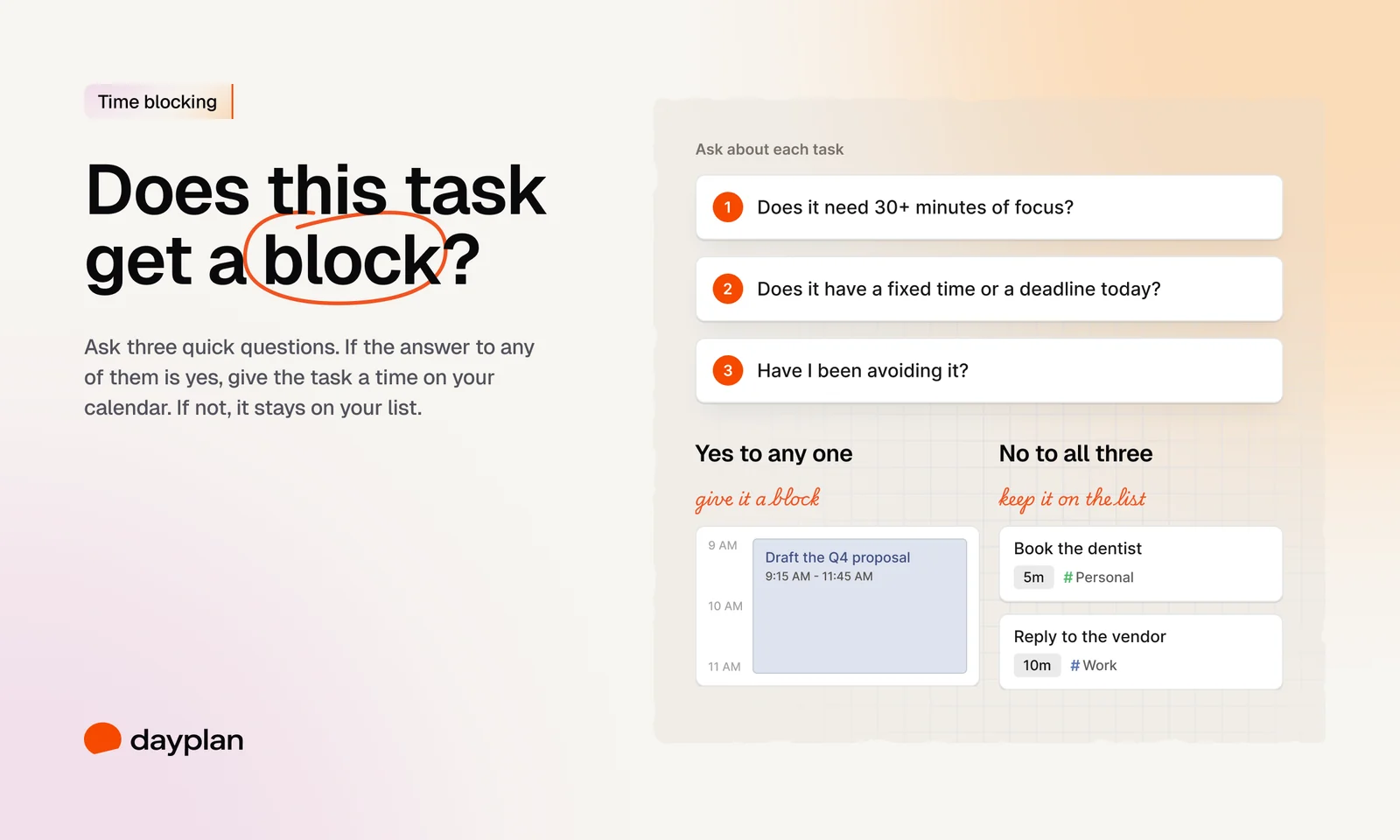
Give a task a slot on the calendar if you can say yes to any of these:
- Does it need 30+ minutes of focus? Writing, analysis, design, studying. Interruptions wreck this kind of work, so it needs protected time.
- Does it have a fixed time or a deadline today? If you need notes for a 1 p.m. call, they have to happen before 1 p.m. So put them there.
- Have I been avoiding it? If it's been sitting on your list for days, the list clearly isn't working for this one. A specific time often does.
Everything else can stay on the list: quick replies, errands, admin, anything under about 15 minutes or that can happen whenever. Those get done in the gaps, or together in one slot you keep for small stuff.
How to use time blocking and a to-do list together: 5 steps
This takes about ten minutes in the morning. Newport does his the evening before, which works just as well if you'd rather wake up to a plan.
1. Keep one list for everything
One list, in one place. Tasks, ideas, the thing you promised someone in a hallway: it all goes there the moment it shows up. Don't worry about how long it gets. That's its job.
2. Pick up to three must-dos
Ask yourself: without which tasks does today not count? Pick three at most. They're usually the ones that pass the block test anyway. (Here's why three works.)
3. Guess, then add a bit extra
Give everything you might do today a rough length. Then pad the big ones. If you think it's two hours, call it two and a half. Your first guess is almost always short; that's the planning fallacy at work.
4. Check it against the hours you actually have
Add it all up and compare it with the time that's really yours: your workday, minus meetings, minus lunch. If the plan is bigger than the day, cut it now, while it's still easy, and move what can wait. This is capacity-first planning, and it's the easiest step to skip.
5. Block your must-dos, breaks, and some empty room
Put your must-dos on the calendar first, at the times you think best. Then add breaks (yes, they count as blocks; here's why) and buffers: empty 15-minute gaps that soak up whatever runs over. Newport does this too. He leaves "extra room" next to his blocks "if the day unfolds in an unexpected way." Don't fill every minute. A day that's blocked solid has nowhere to bend.
A worked example: how to time block your day
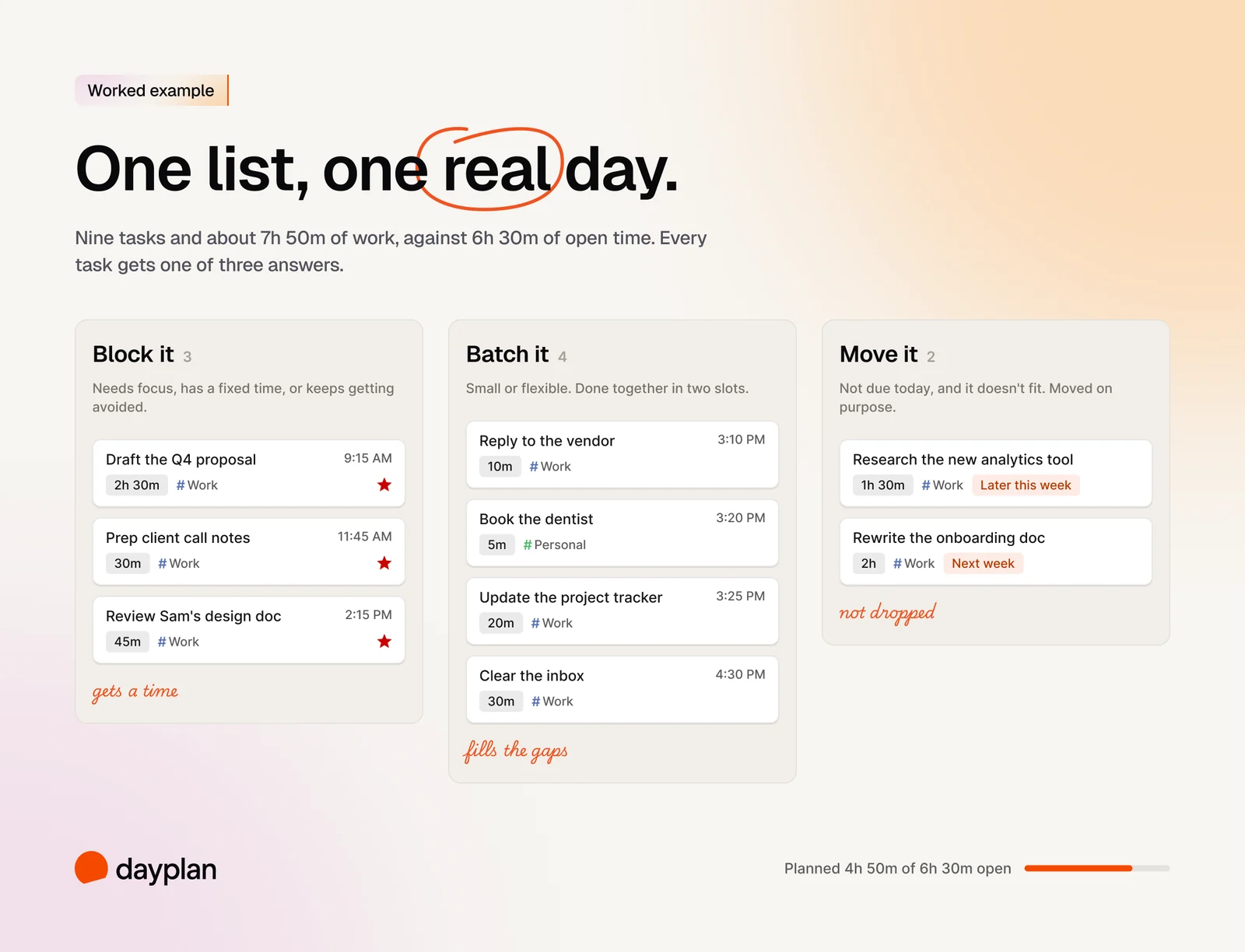
Let's make it concrete. Say it's Wednesday. You work 9 to 6, with three meetings (1h 45m between them) and lunch (45m). That leaves 6h 30m that's actually yours.
What's on the list that morning (9 tasks, about 7h 50m):
- Draft the Q4 proposal (2h)
- Review Sam's design doc (45m)
- Prep notes for the 1 p.m. client call (30m)
- Reply to the vendor about the invoice (10m)
- Book the dentist (5m)
- Update the project tracker (20m)
- Clear the inbox (30m)
- Research the new analytics tool (1h 30m)
- Rewrite the onboarding doc (2h)
That's already more than the day can hold, and nothing's padded yet. So two things move. The analytics research can happen later this week, and the onboarding rewrite can wait until next week. Neither is due. Moving them now, on purpose, beats dropping them at 5 p.m. and feeling bad about it.
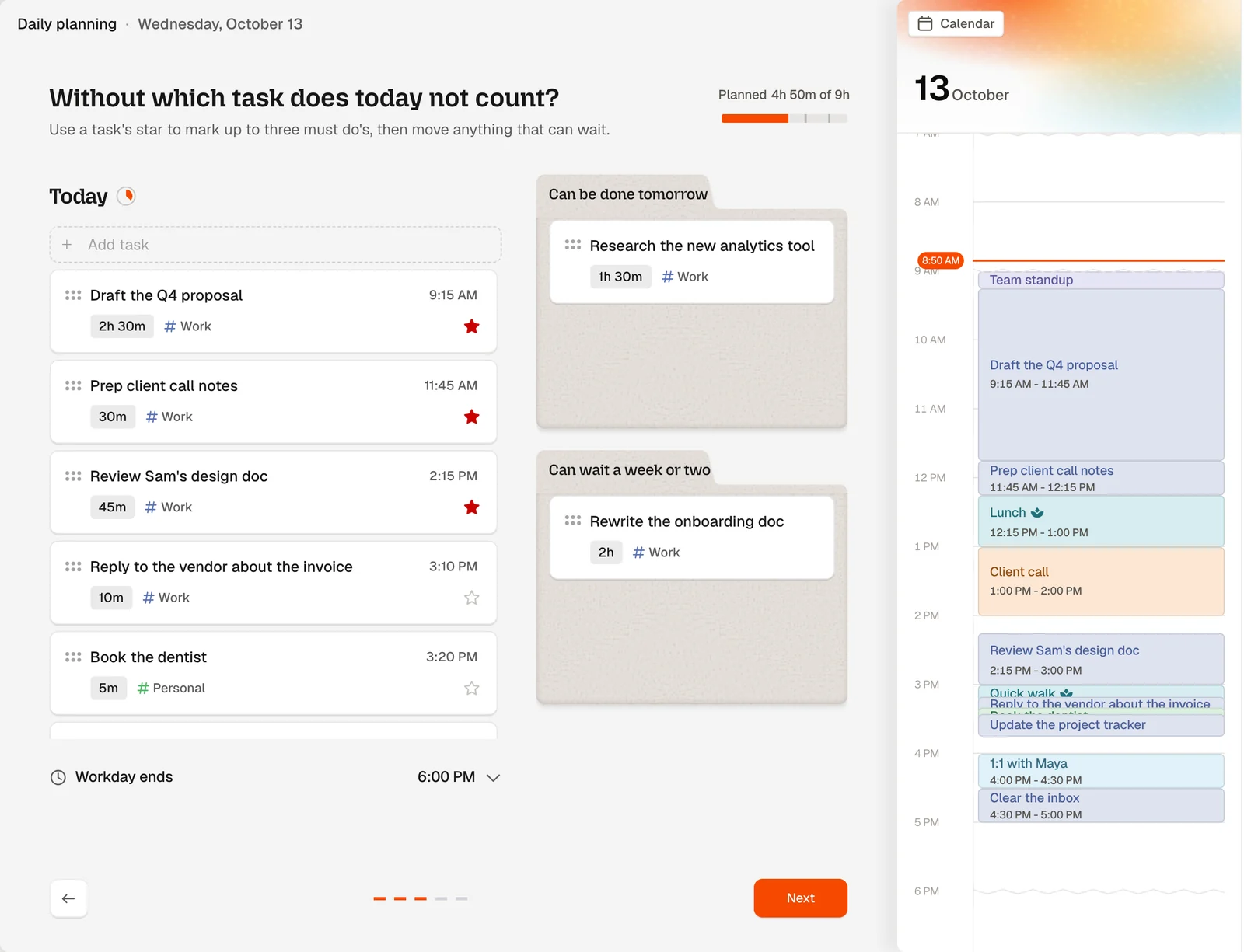
The three must-dos: the Q4 proposal (needs real focus), the call prep (has to happen before 1 p.m.), and Sam's design review (Sam has been waiting two days, and it keeps getting pushed).
Here's the day on the calendar:
| Time | Block | Why it's here |
|---|---|---|
| 9:00 AM | Team standup (15m) | Meeting |
| 9:15 AM | ★ Draft the Q4 proposal (2h 30m) | Focus work, at peak energy; 2h estimate plus 30m padding |
| 11:45 AM | ★ Prep client call notes (30m) | Has to happen before 1 p.m. |
| 12:15 PM | Lunch (45m) | Breaks go on the calendar too |
| 1:00 PM | Client call (1h) | Meeting |
| 2:00 PM | Buffer (15m) | Calls run long |
| 2:15 PM | ★ Review Sam's design doc (45m) | Been avoiding it; now it has a time |
| 3:00 PM | Quick walk (10m) | A reset for the late afternoon |
| 3:10 PM | Small tasks from the list (40m) | Vendor reply, dentist, tracker: no individual blocks |
| 3:50 PM | Buffer (10m) | Room to catch up |
| 4:00 PM | 1:1 with Maya (30m) | Meeting |
| 4:30 PM | Clear the inbox (30m) | Once, not all day |
| 5:00 PM | Shutdown (15m) | Review the list, move what's left |
A few things worth pointing out. The dentist booking and the vendor reply never got their own blocks. They stay on the list and get done together in one 40-minute slot. There are two small buffers for when things run long. And the day wraps up at 5:15, with 45 minutes to spare, because something always takes longer than planned.
What to do when a block runs over
This is where most time-blocking plans fall apart. The proposal takes until 12:30. The call prep hasn't happened. Suddenly it feels like the whole day is ruined. It isn't. Three rules help:
- Don't let one block eat the next. When a block ends and the task isn't done, pause and make a call. Don't just keep going and shove everything else back.
- Pick one of three moves. Finish it later, in a buffer or a gap. Shrink it to the smallest useful piece, like a rough outline instead of a full draft. Or move it to tomorrow, on purpose.
- Re-plan the rest of the day, not the whole day. Take two minutes to slide what's left around. If something no longer fits, move it now, at noon, instead of finding out at 6 p.m.
If blocks run over most days, that's useful information, not a personal failing. Your guesses are too low or your days are too full. Add more padding, and block one less thing.
If your job is unpredictable
Support, management, client work: some jobs are mostly other people's requests. You can still time block, just less. Protect one focus block, ideally early, before the messages start. Leave the rest of the day open and work from your list. Bigger buffers, fewer boxes.
End the day with the list, not the calendar
When you're done for the day, go back to the list one more time. Everything unfinished gets a decision: tomorrow, later, or not at all. It takes a couple of minutes, keeps your list honest, and means you're not lying awake trying to remember what you forgot. (More on this in the evening shutdown ritual.)
Then tomorrow you do it again: the list, three must-dos, rough guesses, a check against your hours, a few blocks.
How Dayplan puts the list and the calendar together
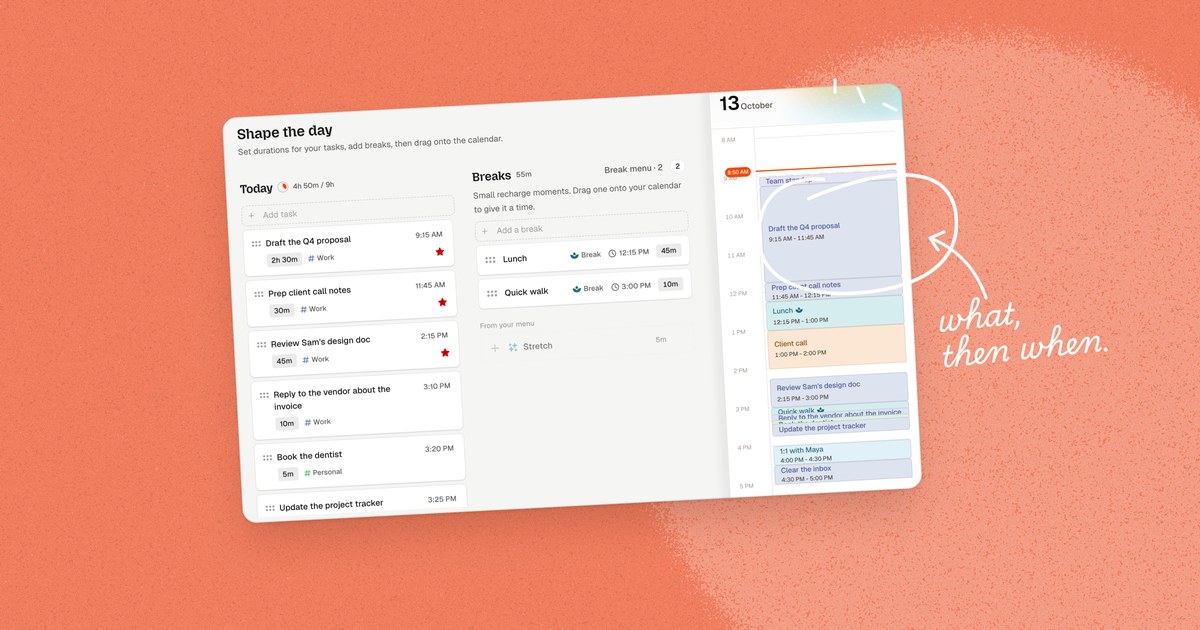
Dayplan is a daily planner that puts your to-do list and your calendar side by side, and we built it around this exact routine, so it does a lot of the bookkeeping for you.
- Every task has a length. If you don't set one, Dayplan assumes 30 minutes and shows a dashed "~30m" pill, so even unestimated tasks count toward your day.
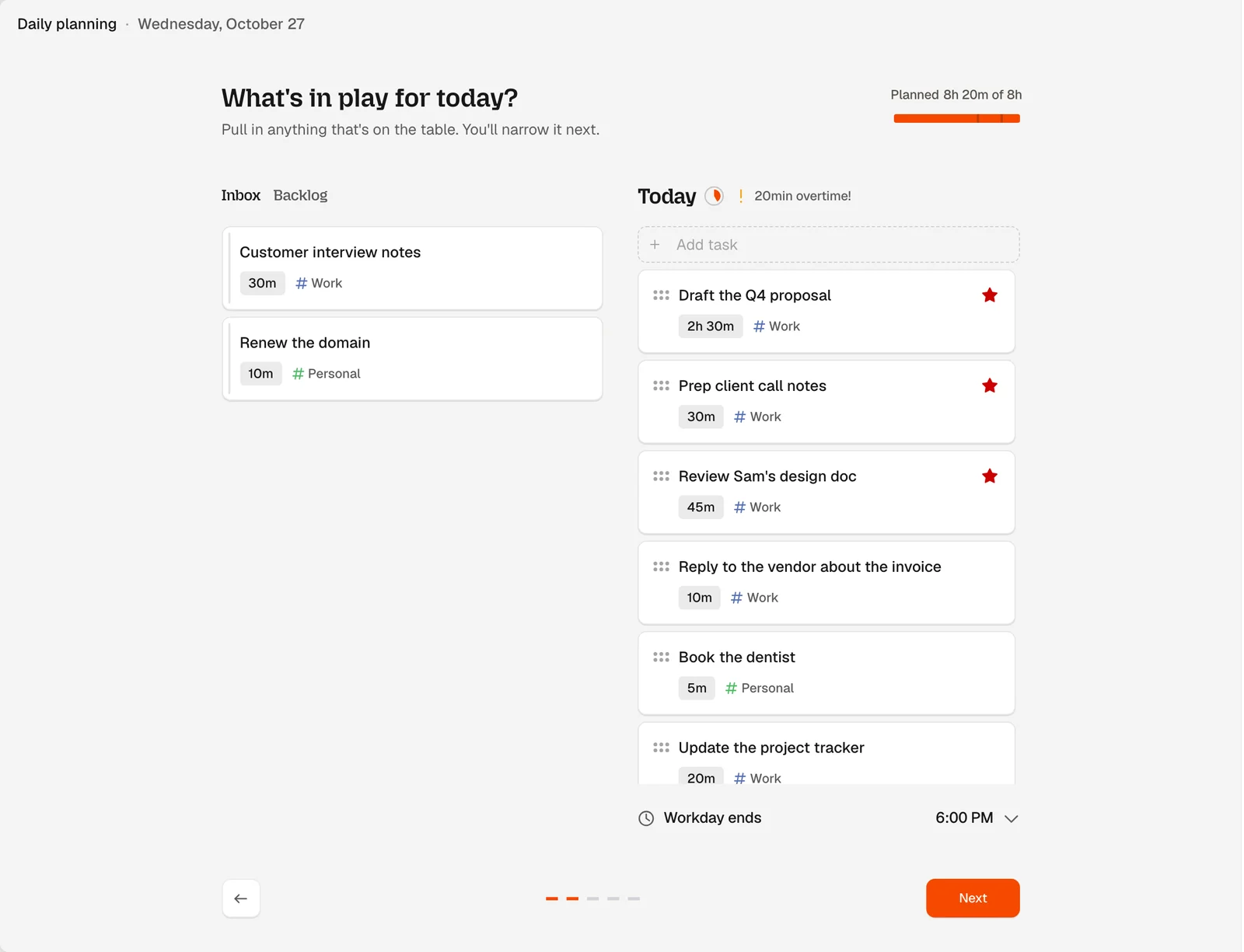
- The workload meter does the math. While you plan, it compares what you've planned with the time left in your workday, like "4h 50m / 9h". Plan too much and it tells you, with something like "20min overtime!". It won't stop you. It just makes the gap hard to miss.
- Must-dos stop at three. Try to star a fourth and Dayplan asks you to unmark one first.
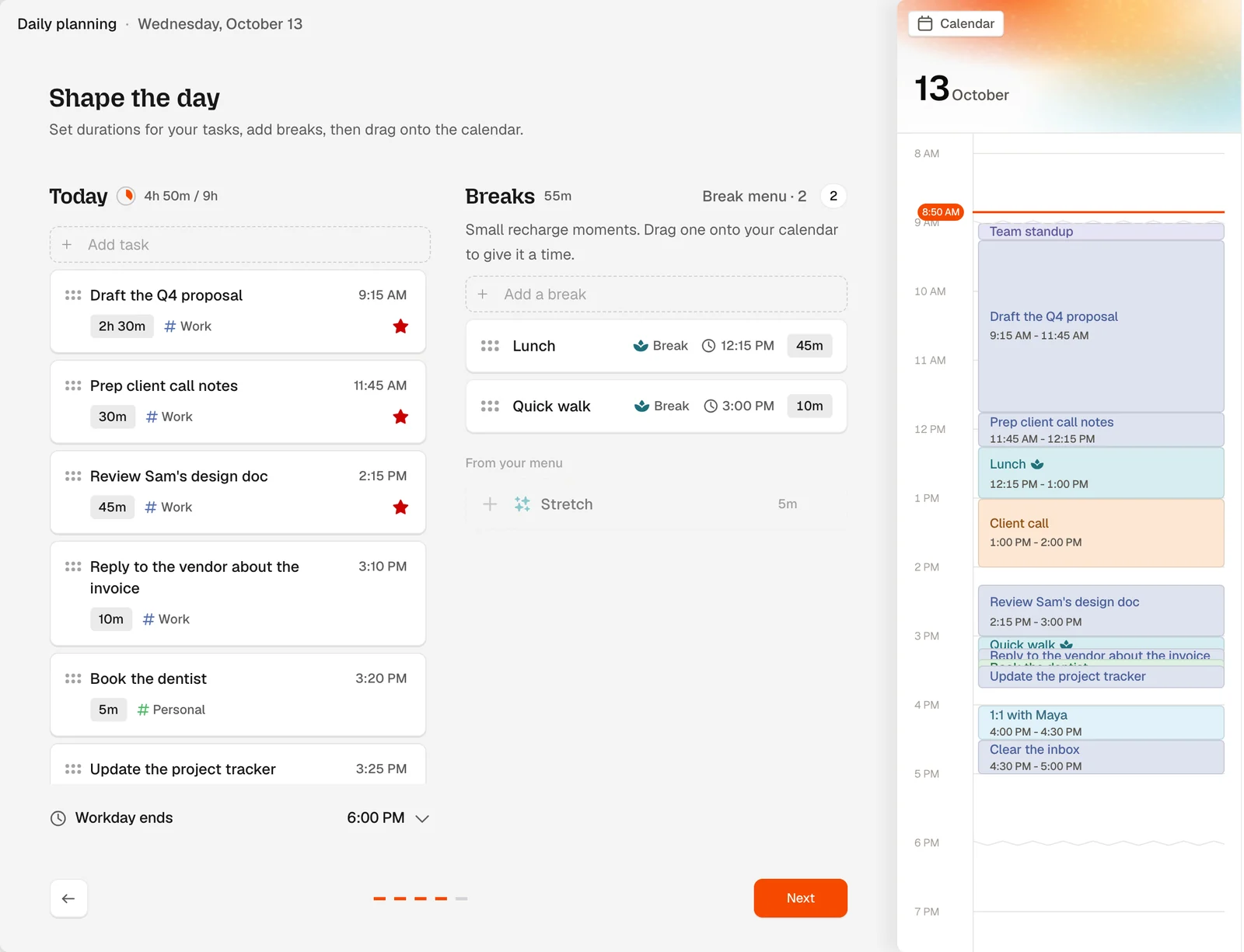
- Blocking is drag and drop. In the Shape the day step, you set durations, add breaks, and drag tasks onto the calendar. Each one becomes a block with a start and an end, and stretching the block changes the task's length. Don't feel like dragging? Pick Auto-schedule to calendar from a task's menu and Dayplan drops it into the first free gap in your work hours.
- Breaks get blocks too. Pick from suggestions like Quick walk, Stretch, or Make a tea, and drag them into the day.
- Nothing slips away quietly. Anything you didn't block stays on your list. The next morning, Dayplan shows you what you Didn't get to yesterday, so you can decide what happens to each one. Tasks you carry over at shutdown come back with a From yesterday badge.
All of that is free. With Pro, your Google and Apple calendar events show up next to your blocks, so you can plan around your real meetings. See how day planning in Dayplan works, or take the full tour in the Dayplan daily planning guide.
Frequently asked questions
A to-do list tells you what needs doing. Time blocking tells you when you'll do it, by giving each task its own slot on your calendar. A list is better for capturing everything, and it bends easily when your day changes. Time blocks are better for focus work and deadlines, because a task with a set time is more likely to get done.
Time blocking is a planning method where you schedule tasks as blocks on your calendar, each with a start and an end, instead of keeping them only on a list. You treat each block like a meeting with yourself. Most people use it for focus work, tasks with a deadline, and things they keep putting off.
Not on its own. They're good at different things. A to-do list is best for catching everything you might do. Time blocking is best for deciding what you'll actually do today, and when. What we recommend is a mix: one list for everything, and blocks only for focus work, fixed-time tasks, and the things you keep putting off.
The idea has good evidence behind it. A review of 94 tests found that deciding when and where you'll do something makes you noticeably more likely to follow through, and lab studies found that a specific plan stops unfinished tasks from nagging at you. The catch is guessing time: people consistently underestimate how long things take, so blocks work best with some padding and a few buffers.
Yes, and that's what we'd suggest. Keep one list for everything. Each morning, pick up to three must-dos, estimate them, check they fit in your free hours, and block those. Small, flexible tasks stay on the list and get done in the gaps, or in one slot for small stuff.
Long enough for the task, plus a little extra. Focus work like writing or analysis usually needs a good stretch; a lot of people block 60 to 90 minutes. Small tasks don't need their own block, so batch them into one 30 to 45-minute slot. And leave a short buffer after big blocks so one overrun doesn't push the whole day back.
When the block ends, stop and decide: finish the task later in a buffer, shrink it to the smallest useful piece, or move it to tomorrow. Then re-plan the rest of the day, not all of it. If this happens most days, add more padding and block fewer things.
Yes, just block less. Protect one focus block, ideally early, and work from your list for the rest of the day. Use bigger buffers and fewer, longer blocks.
People often use them to mean the same thing. When they don't, time blocking means setting aside calendar time for a task or kind of work, and timeboxing means giving a task a fixed amount of time and stopping when it's up. Either way, you're turning a list into a plan with times.
Yes. The to-do list, durations, the workload meter, three must-dos, dragging tasks onto the calendar, breaks, and the daily planning and shutdown rituals are all free, for up to 100 tasks. Pro adds the Coach, connects your Google and Apple calendars, and removes the task limit.
Sources
- Gollwitzer PM, Sheeran P. Implementation intentions and goal achievement: A meta-analysis of effects and processes. Advances in Experimental Social Psychology, 2006.
- Masicampo EJ, Baumeister RF. Consider it done! Plan making can eliminate the cognitive effects of unfulfilled goals. Journal of Personality and Social Psychology, 2011.
- Buehler R, Griffin D, Ross M. Exploring the "planning fallacy": Why people underestimate their task completion times. Journal of Personality and Social Psychology, 1994.
- Leroy S. Why is it so hard to do my work? The challenge of attention residue when switching between work tasks. Organizational Behavior and Human Decision Processes, 2009.
- Cal Newport, Deep Habits: The Importance of Planning Every Minute of Your Work Day, 2013.
- Marc Zao-Sanders, How Timeboxing Works and Why It Will Make You More Productive. Harvard Business Review, 2018.