
TL;DR: The rule of 3 productivity caps a single day at three "Must-Dos"—not your loudest tasks, but the few deliberate choices that move you furthest. It works by removing open decisions, neutralizing Hick's Law and decision fatigue. Dayplan makes this cap a built-in default, protecting your meaningful work from drowning under urgent noise.
Here’s what makes it different: nearly every planner talks about prioritizing, but they all let you pile up unlimited “high‑priority” tasks, quietly rebuilding the overwhelm you were escaping.
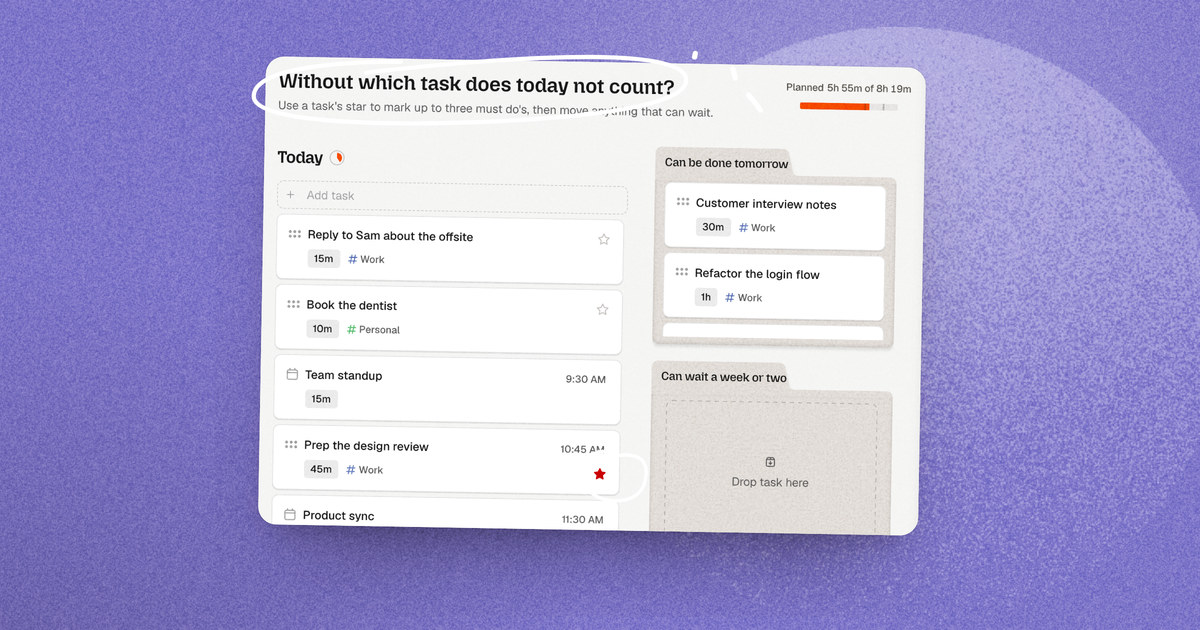
Dayplan is the first daily planner to make the cap a built‑in default rather than a habit you police with willpower. You mark a Must‑Do with one red star; try to star a fourth for the same day and Dayplan stops you. Three is the shape of the day; a fourth is a deliberate exception you have to choose.
One line to remember: a Must‑Do isn’t the loudest thing on your list, it’s the thing that, if you did only it, would make today count.
Why long to‑do lists quietly burn you out
Most tools treat burnout as a volume problem (too much work) and answer with better lists, tags, and filters. But a 40‑item list rarely fails because 40 tasks is physically too much for a day. It fails because it forces you to answer one exhausting question over and over:
“Out of all of this, what do I do right now?”
And worse, it answers that question with the wrong signal. Long lists reward whatever’s loudest — the most urgent, the most overdue, the fastest to check off, not whatever actually matters. You end the day having done a lot and moved nothing, which is the exact feeling that grinds into burnout and lack of fulfillment.
Hick’s Law: more options, slower decisions
Hick’s Law says decision time grows with the number of choices available (Hick, 1952). Two options: near‑instant. Five: noticeably slower. Twenty‑five, each with its own urgency and guilt: you don’t just decide slowly, you stall and procrastinate (Iyengar & Lepper, 2000).
That’s why facing a giant list at 9 a.m. can feel like hitting a wall. It isn’t laziness; it’s your brain paying the Hick’s Law tax on every glance. And a “priority” flag doesn’t fix it: if you can mark 15 tasks “high priority,” you haven’t reduced the options, though you feel like you may have; you’ve just relabeled the wall. The number of choices is the problem, and only a hard cap reduces it.
Decision fatigue: your willpower has a budget
Every choice draws down a finite reserve of mental energy. Cognitive psychology shows that as your mental budget drains, your brain naturally defaults to cognitive shortcuts: postponing complex choices, taking the path of least friction, or favoring low-stakes quick wins over high-leverage work.
Your morning operates on the exact same mechanism. Burn your sharpest decision-making just choosing what to work on, and you reach the actual work already depleted. Repeat it daily for months and you get textbook burnout: busy, drained, and unsure anything important (or anything yours) actually moved.
The core insight: the enemy isn’t the number of tasks, it’s the number of open decisions a plan leaves lying around, and the fact that an open list lets the urgent crowd out the meaningful. The Rule of 3 attacks both. And a cap you don’t have to enforce yourself attacks them for free.
What a Must‑Do actually is (and isn’t)
This is the part that changes everything, and it’s where Dayplan’s framing is different.
A Must‑Do is not:
- the most urgent thing on your plate
- the thing your inbox is shouting about
- whatever’s easiest to finish so you can feel productive
A Must‑Do is the thing you look at and think, “if I do this, today counts. I am closer to who I want to be, if I do this.” You choose it deliberately, in advance, because it’s the highest‑leverage move you can make, the one that carries you furthest.
Sometimes that’s shipping the work that matters, a really important task in a project. Sometimes it’s the 90 minutes on the goal no deadline is forcing. Or sometimes it's finishing taking notes on a podcast which you know contains really useful information. Sometimes it’s the run, the hard conversation, the thing that isn’t “productive” in the shallow sense but is exactly what the person you’re trying to become would do today.
That’s the reframe: a Must‑Do isn’t measured by how loud it is, but by how far it moves you. You’re not triaging a queue, you’re deciding, on purpose, what would make this a day you’re glad you spent. Three of those is a genuinely good day. Ten “priorities” is just the list.
This is why the cap and the framing are one idea, not two. You can only ask “what moves me furthest?” if you’re forced to pick a few. The moment the list is unlimited, the question collapses back into “what’s due?” and the meaningful thing loses to the urgent thing every single time.
Why three, specifically
Three isn’t arbitrary. It’s the number that survives contact with a real day.
- One is fragile. A single priority collapses the moment it’s blocked, and it can’t hold a balanced day (deep work and a key relationship and one thing for future‑you).
- Five‑plus reintroduces the problem. Rank five, six, seven “priorities” and you’ve rebuilt the list you were escaping — Hick’s Law and all.
- Three is legible at a glance. You can hold three outcomes in your head (Cowan, 2001), feel their shape, and know instantly if the day is going the way you meant it to.
Three is small enough to force the “what moves me furthest?” question, and large enough to be a real, whole day. It can also give you the space to have varied priorities between your personal life and your work.
The design choice no other planner makes: enforce the cap
Here’s where Dayplan parts ways with every other task manager.
Todoist, Things, TickTick, Asana, a legal pad, they’ll all let you adopt a “top 3” habit, to use priority tags for your tasks. But they treat it as your problem: nothing stops you from flagging a tenth priority, and by Thursday your “priorities” list is just… the list again. The discipline lives entirely in your willpower, applied at your most depleted moment. That’s exactly where it fails.
Dayplan inverts it. The cap of three Must‑Dos isn’t advice in a blog post, it’s how the product is built. The day starts expecting three, treats a fourth as a deliberate exception, and keeps the three visually distinct so they can’t get buried under urgent noise. The morning question changes shape:
- Every other planner: “How many things should I try to do today, and which ones?” — open, exhausting, re‑litigated daily, and biased toward whatever’s loudest.
- Dayplan: “What three things would make today count?” — closed, deliberate, answerable in under a minute.
The concept of prioritizing — everyone has that. The built‑in, enforced cap that protects the space for meaningful, deliberately chosen work instead of letting it drown in urgent tasks, they don't. Dayplan is anti‑burnout by design.
How the Rule of 3 actually works in Dayplan
The philosophy only matters if the product enforces it. Here’s the actual mechanism.
One tap: the star. You mark a Must‑Do with a single red star on the task. There’s no “high / higher / highest” ladder to agonize over and no “Must do” label cluttering the card — just the star, filled or empty. Tap it and Dayplan asks the one question that matters: is this a Must‑Do? That’s the whole interaction.
The cap is enforced, and it’s on by default. Try to star a fourth Must‑Do for the same day and Dayplan stops you: “You already have 3 must‑do tasks. Unmark another must‑do before adding this one.” This is the part no other planner does, and we intentionally decided to design this into Dayplan.
Elsewhere, “priority” is a label you can slap on infinitely; in Dayplan, three is a real ceiling the app defends for you. You didn’t have to remember to hold the line, and yes, you can toggle this off in the settings if you truly want to. But it starts at three, which is the point: the disciplined choice is the one you don’t have to make.
It’s built into how you plan the day, not bolted on. During Dayplan’s daily planning flow, the star appears on every task for the day next to one prompt: “Without which task does today not count?” That’s the Rule of 3 as a ritual, not a rule you have to remember. You’re choosing your three at the moment you’re deciding the shape of the day, when your judgment is freshest.
Fast capture knows it too. Typing a task in a hurry? Add !must (or !p1) and it lands as a Must‑Do the instant you capture it. The cap still applies, so the discipline follows you even into a two‑second brain‑dump.
How Must‑Dos hold up over real weeks
Three principles keep the cap livable, not just a good Monday that collapses by Thursday, which we have all had.
1. The plan is a decision, made once, then defended
Once your three are set, you stop deciding. The rest of the day is execution, not re‑ranking. A Must‑Do isn’t one suggestion among thirty, it’s one of the things you decided the day was for.
2. Nothing changes invisibly
A common failure mode elsewhere: you set your three, the app quietly reshuffles, a task slides to “later,” and something you cared about vanishes without a word. That destroys trust; and a plan you don’t trust, you re‑check constantly, dropping you right back into decision fatigue.
Dayplan does the opposite. When something moves, it resurfaces with its history and a moment to decide — a small chip like ”↩ back from 2 weeks”, instead of silently disappearing. You never wonder “what happened to that?” The system holds the tail of everything you didn’t choose, so your working memory doesn’t have to. Research finds that simply having a concrete plan for a task stops it from nagging at the mind (Masicampo & Baumeister, 2011). This makes committing to only three feel safe instead of reckless, or like your day is drifting.
3. The overflow has a home
Capping at three only works because the other 37 things aren’t lost, rather they’re held, and they resurface at the right time. That’s what lets you say “not today” without the dread of “am I forgetting something?” The cap protects your attention for what moves you furthest; the backlog protects your memory (be it for the next day, the next week, or the next month). Most tools give you one or the other. Dayplan guarantees both.
Your Must‑Dos aren’t just for you. The Dayplan Coach works from them
Because a Must‑Do is a real signal in Dayplan, not a private mental note, the AI Coach can see it, and it turns your three musts into something the Coach actively helps you execute on, not just a list you stare at.
It knows which tasks are your Must‑Dos. When the Coach reads your day, each task carries its star. So the Coach never treats your three like the other twenty items: it knows the proposal, the deep‑work block, and the hard conversation are the ones that define the day, and it orients its help around them.
It helps you choose them (without thinking it knows better). In the planning flow, if you haven’t named a Must‑Do yet, the Coach nudges the highest‑leverage task and suggests starring it “want to make this your must‑do for today?” and it counts with you: “that’s three for today, and you can have up to three.”
But the moment you’ve chosen your own, it backs off. It proposes when the slot is empty and gets out of the way once you’ve decided, because a coach that keeps re‑litigating your priorities isn’t helping — it’s just more noise.
It breaks the scary one down for you. The most common reason a Must‑Do stalls isn’t laziness, it’s that the task is too big or too vague to start.
Ask the Coach and it will break a Must‑Do into a short checklist of concrete, verb‑first steps small enough to begin right now, and they appear right inside the task’s card. “Send the client proposal” becomes draft the exec summary → pull Q2 numbers → write the pricing section → proofread → hit send.
Suddenly the thing you were avoiding has an obvious first move. From there the Coach can adjust the steps, check them off with you, and keep the time estimate honest, so your Must‑Do goes from a source of dread to a thing that’s actually moving.
That’s the loop the cap makes possible: you choose the three that move you furthest, and the Coach makes sure the biggest one doesn’t die of vagueness.
A worked example: two versions of the same Tuesday
The uncapped Tuesday (every other planner). Drew opens 24 tasks, six flagged "high priority" because the app let her. She spends 20 minutes triaging, picks off four quick low-stakes items for the dopamine hit, and by 2 p.m. has cleared a lot of noise but moved nothing that matters. The proposal that would actually advance her year remains untouched. Result: busy, tired, behind, and quietly disappointed in the day.
The Rule-of-3 Tuesday (Dayplan). Drew's plan opens already expecting three Must-Dos. She ignores "what's due?", asks "what would make today count?", and stars her three priorities in under a minute:
- Send the client proposal — the single high-leverage move that carries the whole quarter furthest.
- 90 minutes on the Q3 model — protected deep work that is important but never urgent. On an uncapped list, it dies in the inbox; here it is secured.
- Start the conversation with the potential gym trainer — a deliberate choice that standard task lists bury under administrative noise.
The proposal feels overwhelming, so she asks the Coach to break it down into five concrete micro-steps. The remaining 21 tasks stay safely in the backlog without competing for focus. When an "urgent" request lands at 11 a.m., she doesn't re-evaluate her whole day, she simply asks if it's worth bumping one of her three capped priorities.
Same person, same 24 tasks. One tool rewards the loudest noise and loses the day; the other protects the three moves that carry him furthest. On top, Dayplan also nudges you to move things into tomorrow or next week, to achieve a realistic workload.
Common objections (and honest answers)
“But I really do have more than three important things.”
You have more than three important tasks. You rarely have more than three that, done today, would move you furthest. The rest still get done! They just don’t get to outshout the meaningful ones. Dayplan holds them; it doesn’t delete them, you can add and see them in your daily plan.
“What if I finish my three by lunch?”
Great! You can take a well-deserved break, and pull the next thing from your backlog. The cap is a floor for focus, not a ceiling on output.
“Isn’t a hard cap too rigid?”
It’s a strong default, not a prison. The limit is on by default and blocks a fourth star, but you can raise it in Settings if you genuinely need to. The discipline isn’t the exact number, it’s that going past three is a chosen exception, not silent list creep. That’s the difference between Dayplan and a tool that just lets the list grow until the meaningful work drowns.
How to choose your three tomorrow
- Ask “what would make today count?” — not “what’s due?” Choose the moves that carry you furthest, before email hijacks the question.
- Include one thing that’s about who you’re becoming, not just what’s owed. Such as the deep work on yourself or on your professional skills, the run, the important conversation. It’s the one an open list always buries.
- Phrase them as outcomes. “Send the proposal,” not “work on proposal.” You want a finish line you can cross.
- Break down the scary one. If a Must‑Do feels too big to start, have the Coach split it into concrete first steps.
- Let everything else wait somewhere you trust. The cap only feels safe when the backlog is reliable, which is exactly what Dayplan guarantees.
The bottom line
Burnout isn’t the price of doing too much. It’s the price of deciding too much and of ending day after day having served the urgent while the meaningful never got its turn.
The Rule of 3 fixes both, and Dayplan is the first planner to make it structural instead of aspirational. By capping the day at three deliberately chosen Must‑Dos, the ones that move you furthest, enforced as a default rather than policed by willpower, Dayplan neutralizes Hick’s Law, protects your decision budget, and keeps the meaningful work from drowning under the loud.
Star your three, let the Coach break down the biggest, and let the rest wait. Not doing less. Choosing what counts, once, then doing it.
Every other tool hands you a bigger list. Dayplan asks you the only question that matters: what three things would make today count?
Frequently asked questions
Capping a day at three “Must‑Dos”, the few you deliberately choose because doing them moves you furthest toward a successful day and the person you want to become, not because they’re the most urgent. The cap removes decision fatigue and keeps focus on what matters. Dayplan is the first planner to structurally enforce this cap, protecting the high-leverage work that moves you furthest.
Dayplan is the first planner to structurally enforce the cap, not just suggest it. Other tools let you tag unlimited “priorities,” so the top‑three stays a habit you have to police with willpower. Dayplan makes three Must‑Dos the built‑in default and stops you from starring a fourth for the same day, protecting the high‑leverage work that moves you furthest instead of letting it drown under urgent noise.
Not urgency — leverage and meaning. A Must‑Do is the thing you’d be glad you did even if nothing else got done: the move that carries you furthest, or the work that reflects who you’re trying to become. You choose it deliberately, in advance.
Tap the red star on any task, that’s it. There’s no priority ladder to fiddle with, and you can also type !must when capturing a task. Dayplan caps you at three Must‑Dos per day by default and stops you from adding a fourth until you unstar one.
Yes. Star a fourth Must‑Do for the same day and Dayplan blocks it with a reminder to unmark one first. The cap is on by default and enforced in the app, not just suggested. You can raise it in Settings, but it starts at three on purpose.
Yes. Your Must‑Dos are a real signal Dayplan’s Coach can read, so it orients its help around them. During planning it can suggest the highest‑leverage task to star (and backs off once you’ve chosen your own), and it can break a big Must‑Do into a checklist of concrete first steps right inside the task card so you can actually start.
Decision time rises with the number of options (Hick’s Law), and each choice drains a finite reserve (decision fatigue). Three is small enough to force the “what moves me furthest?” question and hold in working memory, yet large enough for a full, balanced day.
References
- Hick, W. E. (1952). On the rate of gain of information. Quarterly Journal of Experimental Psychology, 4(1), 11–26.
- Iyengar, S. S., & Lepper, M. R. (2000). When choice is demotivating: Can one desire too much of a good thing? Journal of Personality and Social Psychology, 79(6), 995–1006.
- Cowan, N. (2001). The magical number 4 in short-term memory: A reconsideration of mental storage capacity. Behavioral and Brain Sciences, 24(1), 87–114.
- Masicampo, E. J., & Baumeister, R. F. (2011). Consider it done! Plan making can eliminate the cognitive effects of unfulfilled goals. Journal of Personality and Social Psychology, 101(4), 667–683.